Introduction
In the ever-evolving landscape of web development, staying ahead of the curve is crucial. One technology that has significantly influenced this space is Node.js. Whether you're building a simple website or a complex, real-time application, Node.js offers the versatility, performance, and scalability required for modern web development.
What is Node.js?
Node.js is an open-source, cross-platform JavaScript runtime environment that allows developers to execute JavaScript code on the server side. Traditionally, JavaScript was confined to the browser, but with the advent of Node.js, it has become possible to use JavaScript to write server-side scripts. This means you can use a single programming language—JavaScript—throughout your entire development stack, from the client to the server.
Why Node.js?
- High Performance: Node.js is built on Google Chrome's V8 JavaScript engine, which compiles JavaScript directly into native machine code, making it extremely fast. This speed is one of the primary reasons companies like LinkedIn, Netflix, and Uber have adopted Node.js.
- Scalability: Node.js uses an event-driven, non-blocking I/O model, which makes it lightweight and efficient. This architecture allows for handling multiple connections simultaneously, making it ideal for scalable applications.
- Single Language for Full Stack: With Node.js, developers can use JavaScript for both client-side and server-side development. This unification simplifies the development process, reduces the learning curve, and makes it easier to manage teams and projects.
- Vast Ecosystem: Node.js comes with npm (Node Package Manager), the world's largest software registry. npm hosts thousands of libraries and tools that can be easily integrated into your project, speeding up development time and allowing you to leverage existing solutions.
- Active Community: The Node.js community is one of the largest and most active in the world of web development. This means you have access to a wealth of resources, tutorials, and libraries, as well as ongoing improvements to the platform.
Use Cases for Node.js
Node.js is versatile and can be used in various scenarios. Here are some common use cases:
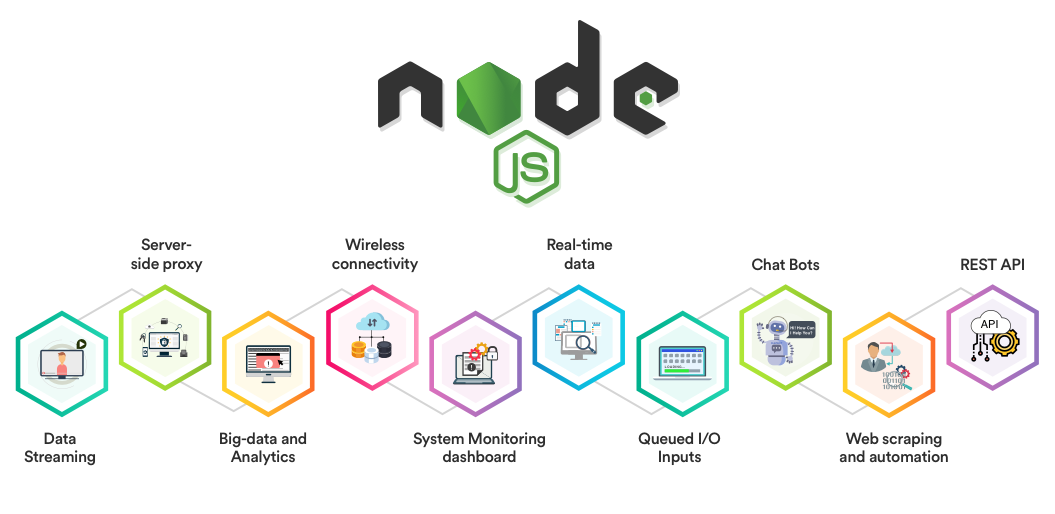
- Real-Time Applications: Node.js is perfect for real-time applications, such as chat applications, online gaming, and collaborative tools. Its non-blocking I/O and event-driven nature make it ideal for applications where you need to handle multiple concurrent connections.
- APIs: With its fast performance and scalability, Node.js is widely used to build RESTful APIs and microservices that can serve millions of users.
- Single Page Applications (SPAs): Node.js works well with front-end frameworks like React, Angular, and Vue.js, making it a great choice for building SPAs where the client-side and server-side code need to communicate seamlessly.
- Streaming Services: Companies like Netflix and YouTube use Node.js to handle streaming data because of its ability to handle asynchronous data flow efficiently.
Getting Started with Node.js
If you're new to Node.js, getting started is straightforward. Here's a quick guide:
Install Node.js: Head over to the official Node.js website and download the latest version of Node.js. The installation comes with npm, so you're ready to start building right away.
Set Up a Project: Create a new directory for your project and navigate to it in your terminal. Run
npm initto set up a new Node.js project. This will create apackage.jsonfile that will manage your project's dependencies.Write Your First Script: Create a file named
app.jsand write a simple script:const http = require('http'); const server = http.createServer((req, res) => { res.statusCode = 200; res.setHeader('Content-Type', 'text/plain'); res.end('Hello, World!\\n'); }); server.listen(3000, () => { console.log('Server running at <http://localhost:3000/>'); });Run Your Script: In your terminal, run
node app.js. This will start a local server on port 3000. Open your browser and navigate tohttp://localhost:3000/to see "Hello, World!" displayed on the screen.Explore npm Packages: With npm, you can install thousands of packages to add functionality to your Node.js application. For example, to install Express.js, a popular web framework, run
npm install express.
Conclusion
Node.js has transformed the way we build web applications, making it possible to create fast, scalable, and efficient applications with ease. Its widespread adoption by major companies is a testament to its reliability and performance. Whether you're a seasoned developer or just starting, Node.js is a powerful tool that should be in your development toolkit.
So, why wait? Dive into Node.js today and start building the next big thing on the web!
require('dotenv').config();
const express = require('express');
const { getPosts, getPostById } = require('./notion');

const app = express();
const PORT = process.env.PORT || 3000;

app.use(express.static('public'));
app.set('view engine', 'ejs');
<!DOCTYPE html>
<html lang="en">
<head>
    <meta charset="UTF-8">
    <meta name="viewport" content="width=device-width, initial-scale=1.0">
    <title>My Blog Post</title>
    <link rel="stylesheet" href="public/styles.css">
</head>
<body>
    <div class="container">
        <header>
            <h1 class="title">My Blog Post</h1>
            <p class="subtitle">A clean and minimalistic design inspired by Notion</p>
        </header>
        <article class="content">
            <h2>Introduction</h2>
            <p>Welcome to my blog post! This is a simple, clean layout inspired by Notion.</p>
            <h2>Section 1: Getting Started</h2>
            <p>This is where you introduce the main topics of your blog.</p>
            <ul>
                <li>Point 1</li>
                <li>Point 2</li>
                <li>Point 3</li>
            </ul>
            <h2>Section 2: Deep Dive</h2>
            <p>Here’s a deeper dive into the subject matter.</p>
            <blockquote>
                "A great quote from someone important."
            </blockquote>
            <h2>Conclusion</h2>
            <p>Wrapping up the blog post with final thoughts.</p>
        </article>
    </div>
</body>
</html>